Who can email your project: the waiting room
Your project has its own email address. That is one of the most useful things in Hemma. But it also means the address is out in the world. Forward it to enough contractors and one day a stranger will email it. A scam invoice, a mistaken forward, an old supplier resurfacing. The waiting room is how Hemma keeps that under control without making you check every message.
01The waiting room
When an email arrives from someone Hemma has never seen before, the message does not land in your project right away. It is held in the waiting room. Hemma stores it, but does not process it, and does not surface it to your team. You decide what happens next.
You will see the new sender in Settings → Senders, under the Unknown filter. Two buttons: Approve or Reject. That is the whole choice.
02Approve a sender
Approving says "yes, this person can email my project." Hemma does three things at once:
- Releases the messages that were waiting from this sender, so they get processed normally and land in your inbox.
- Lets every future email from this address straight through.
- Records who approved them and when, so you have a trail.
Approve once per sender. From that point on, you do not see them in the waiting room again. They just show up in your project like any other email.
03Reject a sender
Rejecting says "no, I do not want emails from this address." The messages already in the waiting room from this sender are quarantined for seven days, then deleted. Future emails from this address skip the waiting room and go straight to quarantine.
Why seven days, not immediate? Because rejection is rarely permanent. You might block a sender, then realise it was a real contractor using a personal address. Within those seven days you can restore them. Hemma releases the quarantined messages back into your project as if you had approved them all along. After seven days the messages are gone and restoring only affects future emails.
04Manage senders
The full list lives at Settings → Senders. Filter by status (All, Approved, Rejected, Unknown) to focus on what you need. Each row shows the email address, when Hemma first saw it, the last activity, and how many messages have come from that sender.
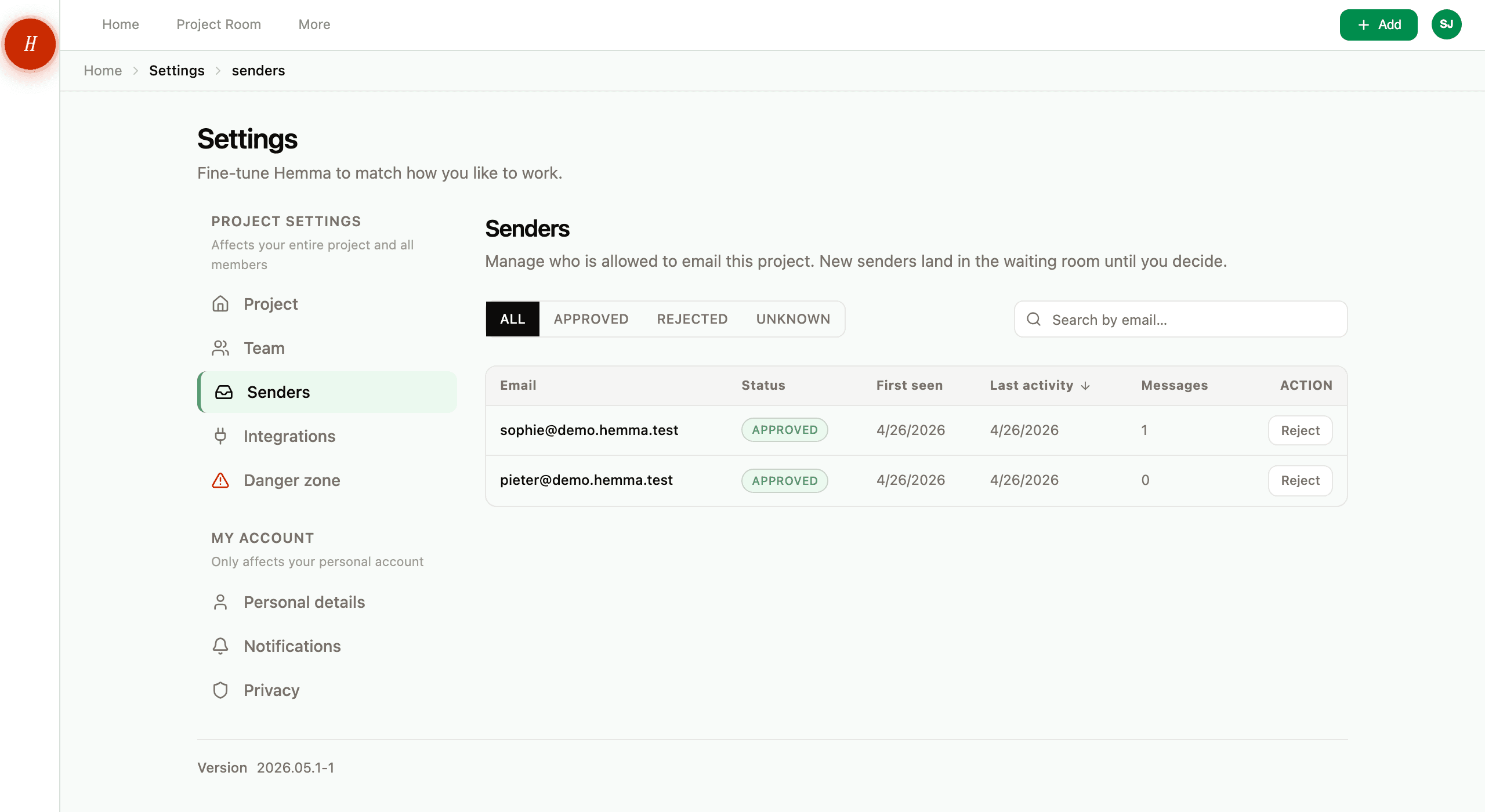
Actions are per-row:
- Unknown: Approve or Reject.
- Approved: Reject (moves them to the rejected list).
- Rejected: Restore (only meaningful within the seven-day window for held messages, but always works for future emails).
05A few things worth knowing
The sender list is shared with your project, not personal. If your partner approves a sender, they are approved for both of you. The same goes for rejecting. The list is the project's source of truth.
Project members are always approved. Anyone who is a member of your project (you, your partner, anyone else you add later) has their email address approved automatically the moment they join. Their messages and forwards skip the waiting room entirely, and this is part of membership: it cannot be turned off. If you no longer want a member's messages reaching the project, the way to stop them is to remove them as a project member.
Forwarded emails use the forwarder's address. If your architect forwards an invoice from a contractor, the sender Hemma sees is your architect, not the contractor. That is normally what you want. Once you have approved your architect (or once they joined as a member), anything they forward gets through. It also means rejecting the contractor's address would have no effect on forwards coming via your architect.
Malicious emails never reach the waiting room. Hemma scans every inbound message for phishing, prompt injection, and dangerous attachments before any sender check happens. Anything flagged as malicious is dropped immediately and never appears in your senders list.
No bulk actions. Each sender is decided one at a time. In practice the waiting room rarely fills up. Most projects see only a handful of new senders during a build.
06Why a waiting room and not a blocklist
A blocklist would mean every stranger lands in your project by default and you have to clean up after the fact. A waiting room flips it: nothing reaches your project until you say yes. The first time a contractor emails you, it takes one tap to approve them. Forever after, their emails just work. That is a few seconds at the start of the relationship and then nothing. Exactly the trade-off Hemma is built to make.