Een plan delen met je architect
Je hebt een plan geannoteerd. Nu wil je dat je architect het ziet, je vragen beantwoordt, en zijn eigen opmerkingen toevoegt. Je wilt hen geen Hemma-account bezorgen, je wilt hen geen toegang geven tot je facturen, en je wilt geen nieuwe e-mailthread starten met screenshots. Delen lost alle drie op. Eén plan, één link, volledige samenwerking.
01Wat delen precies doet
Wanneer je een plan deelt, genereert Hemma een veilige link gekoppeld aan het e-mailadres van je architect. Ze openen de link, bevestigen hun e-mail, en krijgen een view op dat ene plan: jouw annotaties, het document zelf, en een plek om te reageren.
Dat is alles wat ze krijgen. Geen toegang tot je andere plannen. Geen zicht op je budget. Geen venster op je aannemers of facturen. De deling is beperkt tot één plan, en de rest van je project blijft privé.
02Stuur de link
Open het plan dat je wilt delen en zoek de deeloptie in de plan-view. Voer het e-mailadres van je architect in, en Hemma verstuurt de eerste keer een uitnodiging. Hun toegang verloopt niet, en op het scherm Architecten in Instellingen zie en wijzig je welke plannen ze mogen openen. Je kunt op elk moment intrekken. Kon de uitnodigingsmail niet verstuurd worden, dan staat dat op de kaart van de architect op dat scherm, met de knop Uitnodiging opnieuw versturen.
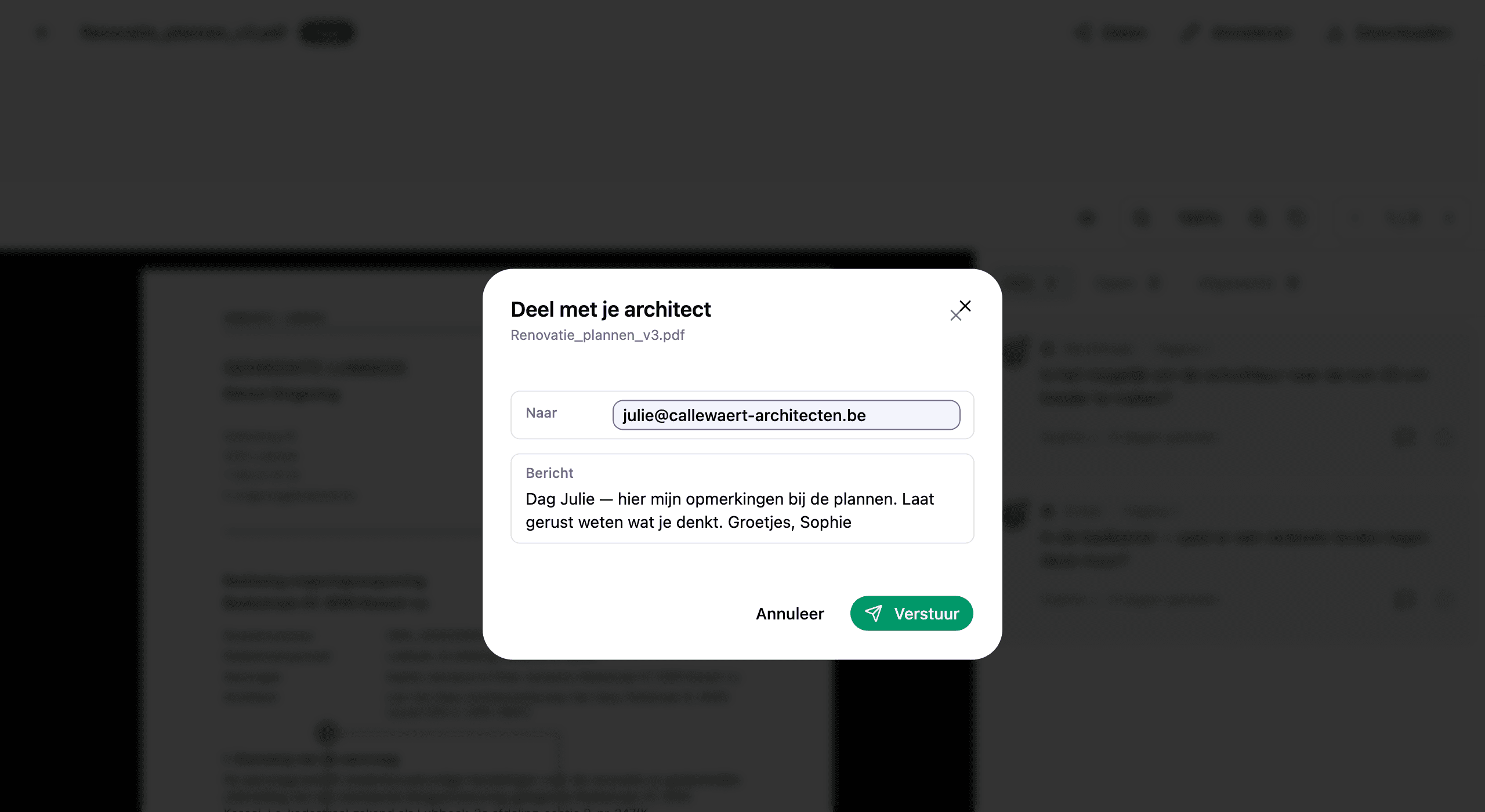
Gebruik het e-mailadres dat je architect ook professioneel deelt. Hemma gebruikt het om hen bij elk bezoek te verifiëren, dus een stabiel adres houdt alles wrijvingsloos.
03Wat je architect ziet
Je architect ontvangt een e-mail met een link. Bij het klikken vraagt Hemma om het e-mailadres te bevestigen. Een snelle veiligheidsstap zodat niemand anders de link kan gebruiken als ze wordt doorgestuurd. Daarna geven ze hun naam in, gaan ze akkoord met de voorwaarden, en het plan opent.
Wat ze zien:
- Het plan zelf, precies zoals je het hebt geüpload.
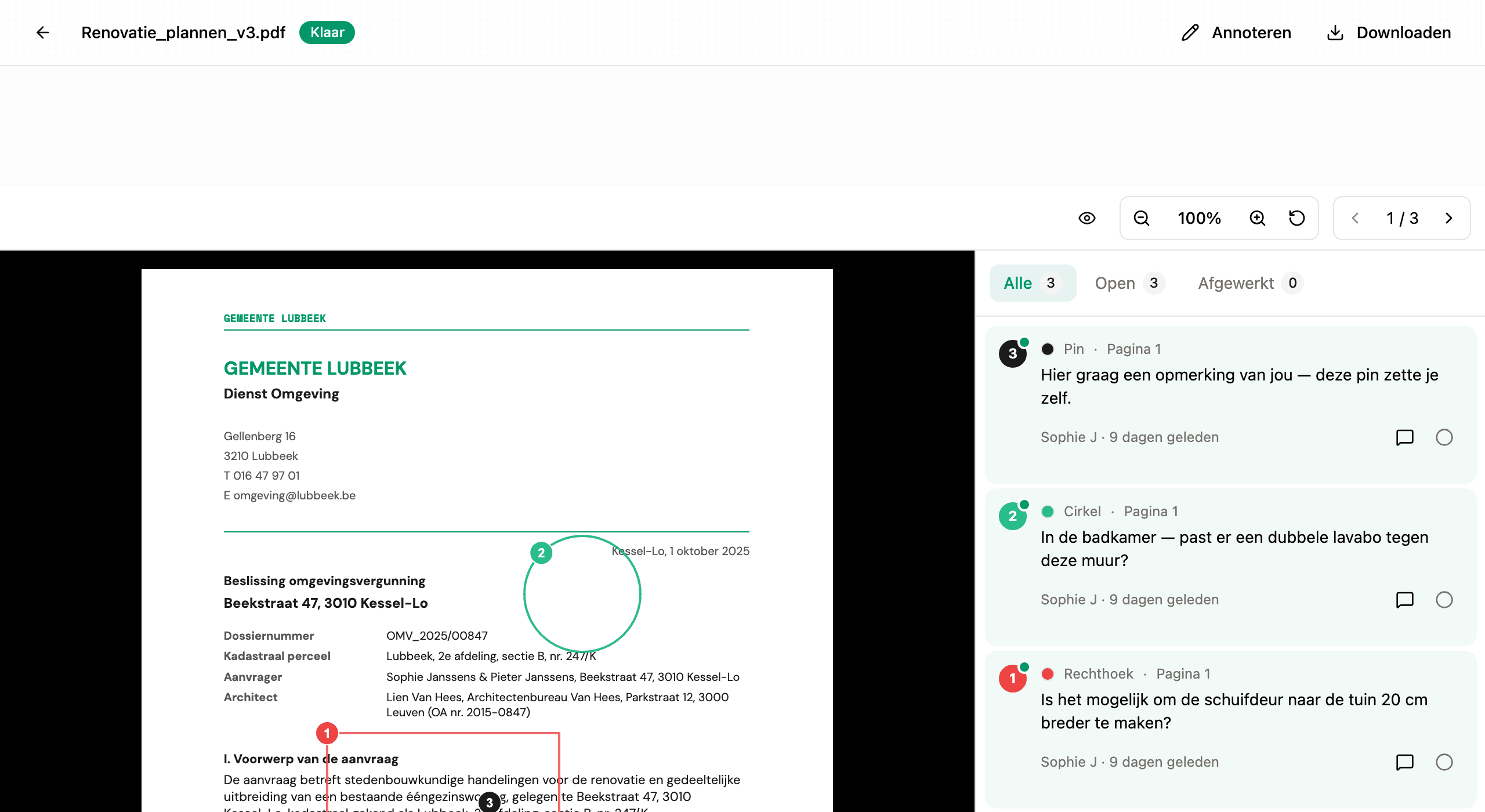
- Elke annotatie die jij en anderen hebben geplaatst, met alle reacties en de status afgewerkt.
- Een reactieveld bij elke annotatie, en de mogelijkheid om eigen annotaties te plaatsen.
Wat ze niet zien:
- Een ander plan, bestand of document in je project.
- Je budget, aannemers of berichten.
- Wie er nog op je project zit, behalve de mensen die op dit plan hebben geannoteerd.
04Wat je architect kan doen
Architecten gebruiken dezelfde annotatietools als jij. Ze kunnen:
- Het plan annoteren met pins, cirkels, rechthoeken, pijlen of vrije hand, om precies aan te duiden wat ze bedoelen.
- Reageren op elke annotatie, ook de jouwe. Reacties tonen hun naam en verschijnen in jouw zijbalk.
- Annotaties als afgewerkt markeren wanneer een vraag beantwoord is.
Alles wat ze toevoegen draagt hun naam, zodat je altijd ziet wie wat zei. Annotatietools legt uit waarvoor elke tool dient.
Plannen toevoegen staat standaard uit. Bij Instellingen, Architecten zet je Mag plannen toevoegen aan voor een architect. Zet je het later weer uit, dan kunnen er geen nieuwe plannen bij; de plannen die ze al toevoegden blijven in je project. Beëindig je de toegang van een architect en nodig je hen opnieuw uit, dan staat het weer uit. Staat het aan, dan ziet je architect Plan toevoegen op de projectpagina in Met je gedeeld. Ze kiezen een pdf of een foto (maximaal 10 MB per bestand), Hemma leest het zoals elk plan dat je zelf toevoegt, en het staat meteen open voor opmerkingen. Het telt mee voor je project en je kunt het verwijderen zoals elk ander plan. Iedereen op het project krijgt één e-mail wanneer ze plannen toevoegden, niet één per plan: die komt een paar minuten nadat ze stoppen, in ieders eigen taal.
05Reacties blijven gesynchroniseerd
Elke reactie, van beide kanten, triggert een e-mail naar de andere mensen op de annotatiedraad. Je architect reageert en jij krijgt een notificatie. Jij reageert en zij krijgen er een. Niemand hoeft in te loggen om te checken of er iets veranderd is.
Binnen Hemma verschijnen nieuwe reacties met een ongelezen-indicator op de annotatiekaart. Je kunt de zijbalk in één oogopslag scannen en precies zien waar het gesprek naartoe is verschoven.
06Alles op één plek
Nadat je architect een eerste link heeft geopend, heeft die de links in je mails niet meer nodig. Wie inlogt in Hemma, komt op een pagina Met je gedeeld terecht: elk project waarvan iemand plannen deelde, met bovenaan wat er nieuw is (nieuwe opmerkingen, plannen die nog niet geopend zijn) en de links die binnenkort verlopen. Je architect opent een project om de plannen te zien, zoekt op de naam van een plan of op een woord uit een opmerking, en gaat vanuit elk plan terug naar het project.
Een plan dat je per mail deelde, staat daar ook nog voor het geopend is, met het label Nog niet geopend. Zodra een link is afgelopen (je trok hem in of hij verliep), blijft het plan staan als Link verlopen, met de tip om jou om een nieuwe te vragen. Plannen waartoe je toegang gaf via Architecten werken anders: haal je een plan uit de selectie, dan verdwijnt het van hun pagina, en beëindig je hun toegang, dan staat het project als Toegang beëindigd, zonder plannen.
07Toegang intrekken
Als het project klaar is, de deling niet meer nodig is, of je simpelweg van gedachten bent veranderd, kun je de link intrekken vanaf dezelfde plek waar je hem hebt aangemaakt. Intrekken is onmiddellijk. De volgende keer dat je architect het plan probeert te openen, zien ze een melding dat de toegang niet meer beschikbaar is.
De annotaties en reacties die ze hebben toegevoegd blijven op het plan staan. Intrekken verwijdert het gesprek niet. Het stopt enkel nieuwe bezoeken.
08Een ander model dan iemand in CC zetten
De oude manier: een PDF doorsturen, een screenshot bijvoegen, een paragraaf schrijven om uit te leggen waarnaar te kijken, hopen dat de reactie in dezelfde thread terechtkomt, het overzicht verliezen wanneer de volgende planversie binnenkomt. De nieuwe manier: één link, één document, één gesprek dat aan de tekening verbonden blijft.
Je plan blijft de bron van waarheid. Je architect doet mee aan het gesprek. De draad blijft op één plek.