Share a plan with your architect
You marked up a plan. Now you want your architect to see it, answer your questions, and add their own remarks. You don't want to send them a Hemma account, you don't want to give them access to your invoices, and you don't want to start a new email thread with screenshots. Sharing solves all three. One plan, one link, full collaboration.
01What sharing actually does
When you share a plan, Hemma generates a secure link tied to your architect's email address. They open it, confirm their email, and get a view of that one plan: your annotations, the document itself, and a place to reply.
That is everything they get. No access to your other plans. No view of your budget. No window into your contractors or invoices. The share is scoped to a single plan, and the rest of your project stays private.
02Send the link
Open the plan you want to share, then look for the share option in the plan view. Enter your architect's email address, and Hemma sends them an invitation the first time. Their access does not expire, and you can see and change which plans they can open on the Architects screen in Settings. You can revoke it at any time. If the invitation email could not be sent, the architect's card on that screen says so and offers Send invitation again.
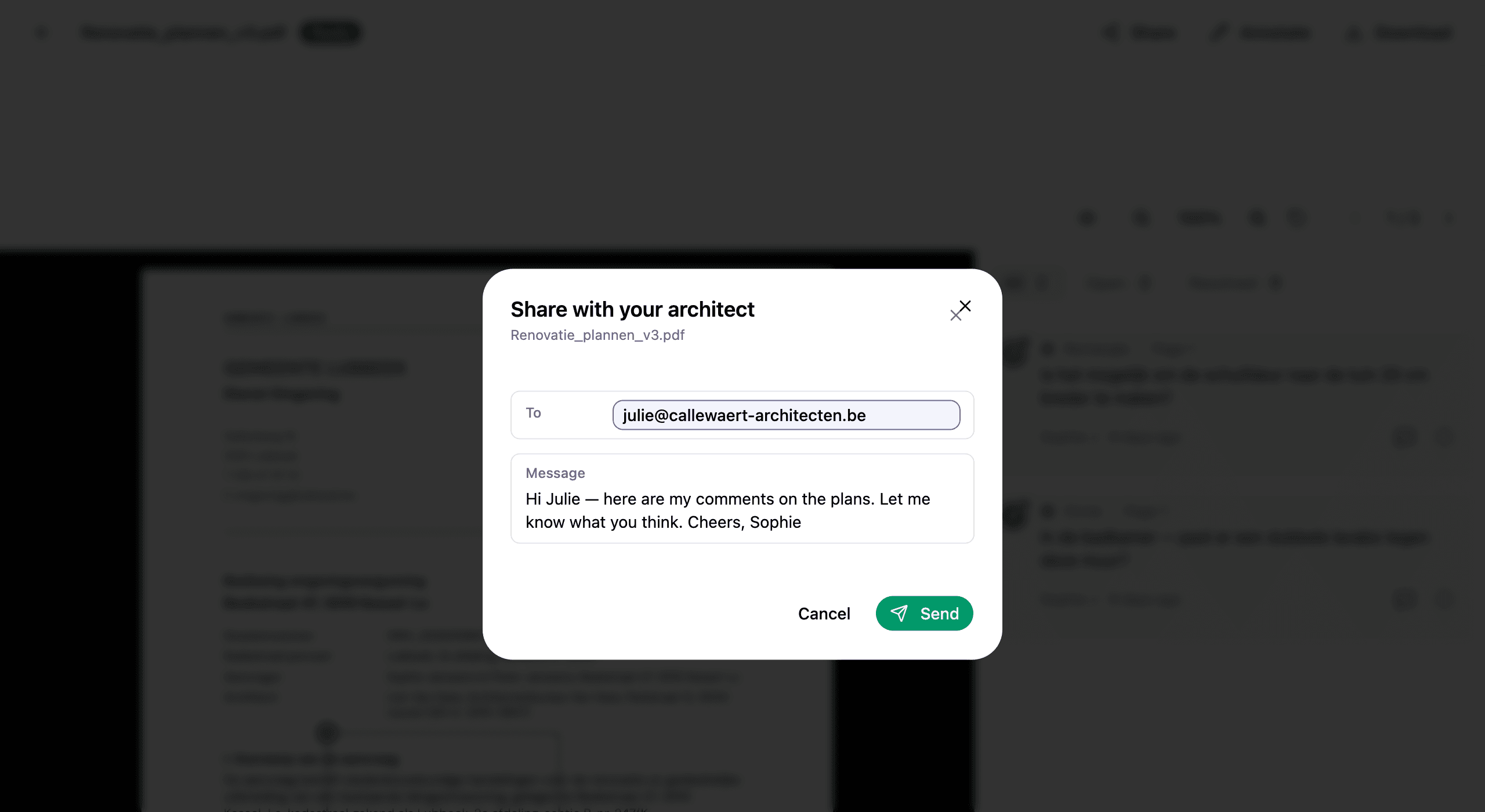
Use the email address your architect already gives out professionally. Hemma uses it to verify them on every visit, so a stable address keeps things friction-free.
03What your architect sees
Your architect receives an email with a link. When they click it, Hemma asks them to confirm the email address. A quick safety step that means no one else can use the link if it gets forwarded. Then they enter their name, agree to terms, and the plan opens.
What they see:
- The plan itself, exactly as you uploaded it.
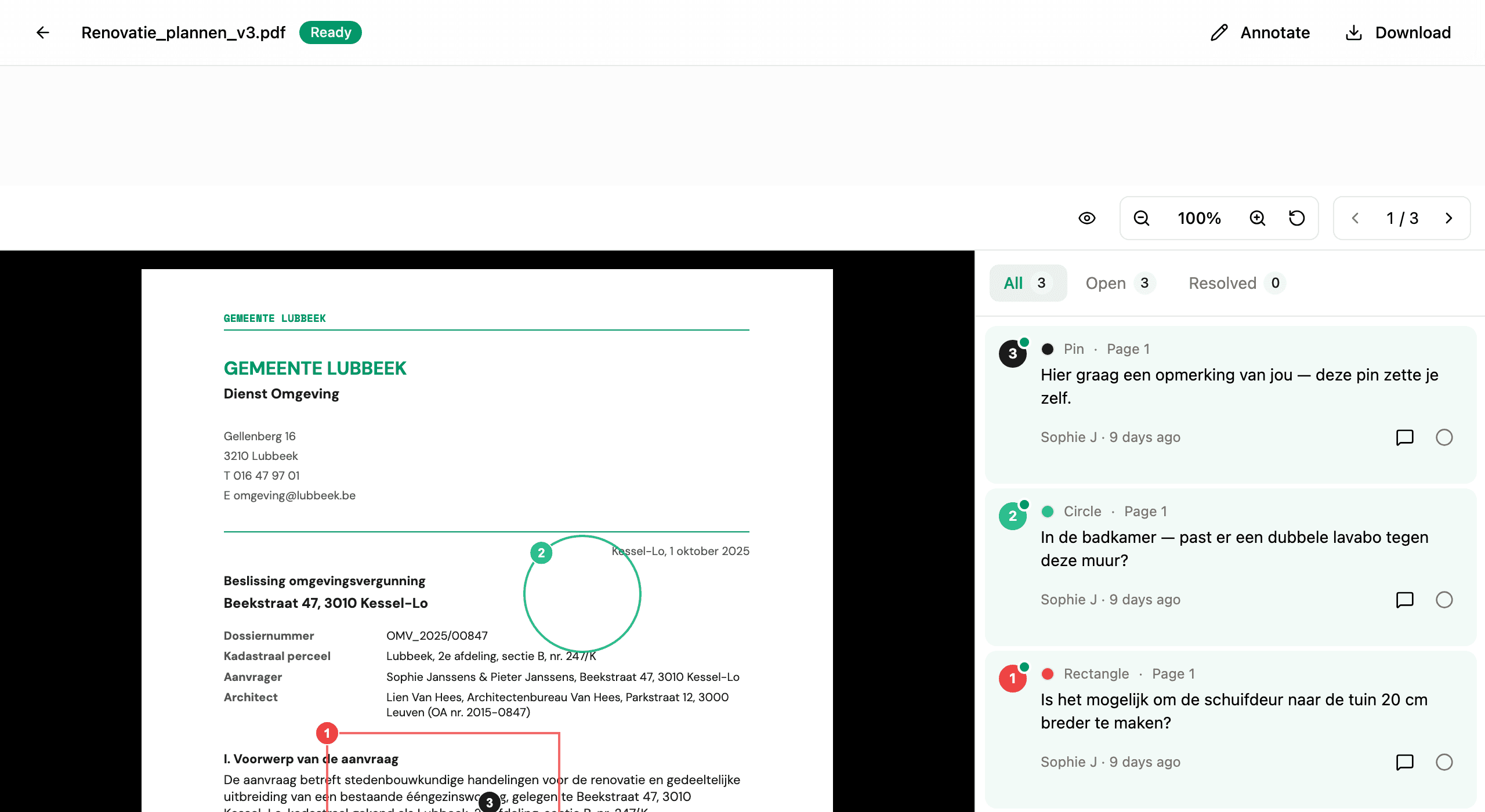
- Every annotation you and others have placed, with all replies and resolved status.
- A reply field on every annotation, and the ability to add annotations of their own.
What they don't see:
- Any other plan, file, or document in your project.
- Your budget, contractors, or messages.
- Who else is on your project beyond the people who annotated this plan.
04What your architect can do
Architects use the same annotation tools you do. They can:
- Annotate the plan with pins, circles, rectangles, arrows, or freehand drawing, to point at exactly what they mean.
- Reply to any annotation, including yours. Replies show their name and arrive in your sidebar.
- Mark annotations resolved when a question is answered.
Everything they add carries their name, so you can always tell who said what. Annotation tools explains what each tool is for.
Adding plans is off by default. In Settings, Architects you can switch on Can add plans for an architect. Switching it off later stops new plans; the ones they already added stay in your project. If you end an architect's access and invite them again, it starts switched off. With it on, your architect sees Add a plan on the project page in Shared with you. They pick a PDF or a photo (up to 10 MB each), Hemma reads it like any plan you add yourself, and it opens for comments right away. It counts towards your project, and you can remove it like any other plan. Everyone on the project gets one email when they have added plans, not one per plan: it arrives a couple of minutes after they stop adding, in each person's own language.
05Replies stay in sync
Every reply, from either side, triggers an email to the other people on the annotation thread. Your architect replies and you get a notification. You reply and they get one. Nobody has to log in just to check whether anything changed.
Inside Hemma, new replies show up with an unread indicator on the annotation card. You can scan the sidebar at a glance and see exactly where the conversation has moved.
06Everything in one place
After your architect has opened a first link, they don't need the links in your emails any more. When they sign in to Hemma, they land on a page called Shared with you: every project that someone shared plans from, with what is new for them on top (new comments, plans they haven't opened yet) and the links that expire soon. They open a project to see its plans, search by plan name or by a word from a comment, and go back to the project from any plan.
A plan you shared by email shows up there too before they have opened it, marked Not opened yet. Once a link has ended (you revoked it, or it expired), the plan stays listed as Link ended, with a note to ask you for a new one. Plans you gave access to through Architects work differently: a plan you take out of the selection disappears from their page, and if you end their access the project shows as Access ended, with no plans listed.
07Revoking access
If the project is finished, the share is no longer needed, or you simply changed your mind, you can revoke the link from the same place you created it. Revoke is immediate. The next time your architect tries to open the plan, they see a notice that access is no longer available.
The annotations and replies they added stay on the plan. Revoking access does not delete the conversation. It only stops new visits.
08A different model from CC'ing them on email
The old way: forward a PDF, attach a screenshot, write a paragraph explaining what to look at, hope the reply lands in the same thread, lose track when the next plan revision arrives. The new way: one link, one document, one conversation that stays attached to the drawing.
Your plan stays the source of truth. Your architect joins the conversation. The thread stays in one place.