Finding a document
The Files page is where every document lives. Forwarded invoices, permits, plans, photos. After a few months of building, the list gets long. Three controls keep it manageable.
01Where to look
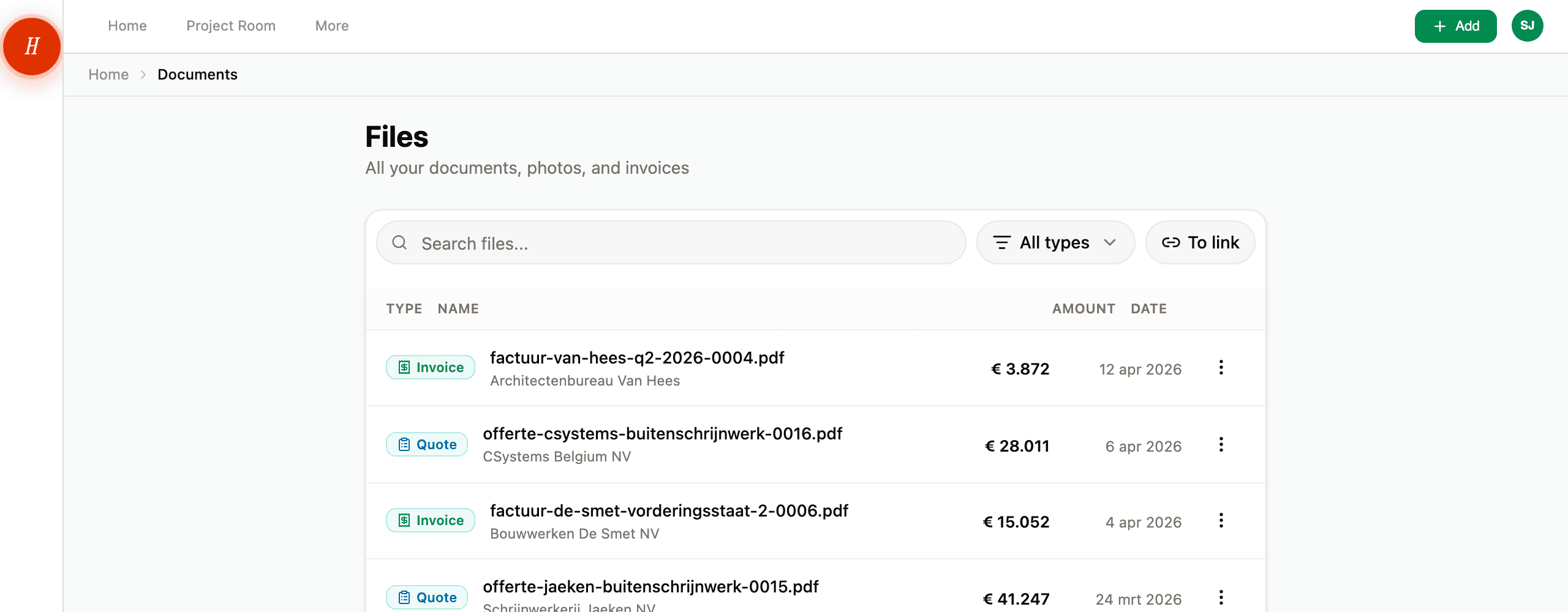
Open Files from the main navigation. You see a list of every document in your project, newest first.
At the top of the list:
- A search box.
- A type dropdown — All types, Invoices, Quotes, Permits, Plans, Photos, Inspiration, Technical docs, Other.
- A To link toggle that filters down to invoices and quotes that have not been linked to a budget line yet.
02Search
The search box looks across five fields at once for whatever you type:
- The document name.
- The description.
- The file name (the original
.pdfyour contractor sent). - The contractor or organisation name.
- Your tags.
So if you remember the contractor name, search by that. If you remember the file name, search by that. If you tagged it electrical, search by that. Whichever scrap you remember, type it in.
Search is partial: typing electr matches "electrical", "electricity", and any contractor with electr in the name. Case does not matter for most fields, but tag matching is exact — so electrical finds the tag electrical, not Electrical.
You can combine search with the type filter. Type "Van Houten" and pick Invoices to see only the invoices from that contractor.
03Filter by type
The type dropdown narrows to one document type at a time. Useful when you know what you are looking for is an invoice, but cannot remember the contractor. Pick Invoices and scroll. On a phone the dropdown is a row of chips instead: All, Plans, Invoices, Quotes and Permits. Swipe the row sideways and tap one.
The labels match the eight types Hemma classifies into — see what kinds of documents Hemma understands for what each one means.
04The "To link" filter
When an invoice or quote arrives, Hemma extracts the amounts but does not assume which budget line it belongs to. That is your call. The To link toggle filters the list to invoices and quotes that have not been linked yet — your follow-up pile, in one view.
Once you link an invoice to a budget line, it disappears from this filter. So an empty To link view means you are caught up.
05Common questions
My document is not in the list. Did Hemma lose it? Almost certainly not. It might be filtered out by the current type or to-link toggle, or held back as a duplicate, or waiting in the senders waiting room. See I can't find a document I uploaded for the full diagnostic.
Can I search by date? Not directly in the search box. The list is already sorted newest-first, so scrolling to roughly the date you want is usually faster than a search. For specific date ranges, use the calendar — every document with a date attached shows up there.
Can I save a search? Not yet. The combination of search text and type filter is in the URL, so you can bookmark a particular view in your browser.
06What if it goes wrong
- The search returns nothing for a document you are sure exists? See I can't find a document I uploaded.
- An email you forwarded is not even on the Files page? See an email I forwarded didn't arrive.